GoHighLevel Reply Management: Why Cold Email Replies Never Reach Conversations, and the Fix
You run nine clients in GoHighLevel, one sub-account each, pipelines built, automations firing. Your cold email goes out through Smartlead and Email Bison on roughly 1,600 Google and Outlook mailboxes. Then a prospect replies “sure, send me a time” and nobody in GoHighLevel ever sees it, because GoHighLevel reply management for cold outbound does not work the way the rest of the platform works.
This is not a misconfiguration you can fix in settings. It is an architectural boundary, and once you see where it sits you can design around it in an afternoon. This playbook covers what actually captures a cold reply in HighLevel, the one sub-account rule that breaks agencies, why none of it applies to mailboxes you send from through a sequencer, and the architecture that keeps GoHighLevel as your pipeline of record without asking it to be your reply desk.
Why GoHighLevel reply management breaks for cold email
GoHighLevel is excellent at the job it was built for. Sub-accounts give you real client separation, Opportunity pipelines are genuinely good, and Conversations is a capable inbox for people who are already in your CRM. That last clause is the whole problem.
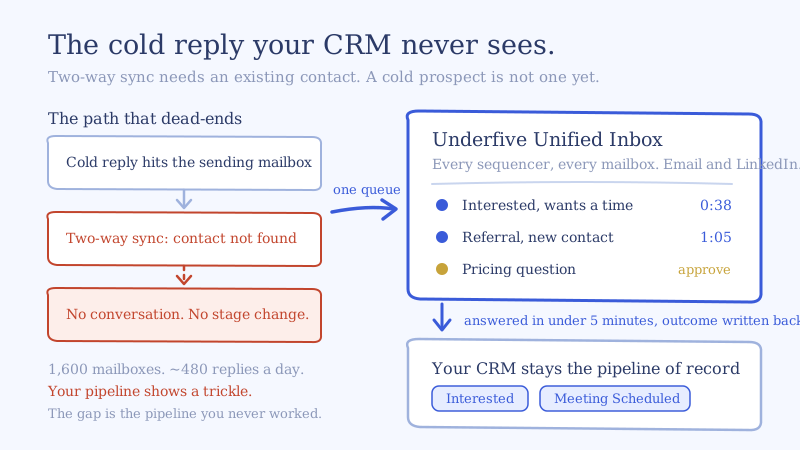
Two-way email sync, the Gmail and Outlook connection most agencies set up first, matches inbound mail to an existing contact record. A cold prospect is by definition not an existing contact. They were uploaded to your sequencer, not to GoHighLevel, and the first time they become a known human to anyone is the moment they reply. HighLevel’s own documentation is direct about the limit: two-way sync and generic SMTP configurations cannot capture cold inbound email, and work only with contacts that already exist.
So the reply lands in the Google mailbox it was sent from. It appears in your sequencer’s inbox. It does not create a contact in GoHighLevel, it does not open a conversation, and it does not fire the workflow you built to move that Opportunity to Interested. Your automation layer is intact and simply never triggers.
The failure mode is quiet, which is what makes it expensive. Nothing errors. Your GoHighLevel reporting shows a thin trickle of replies, your sequencer shows the real number, and the gap between those two numbers is the pipeline you are not working.
What actually captures cold inbound email in HighLevel
There is a supported path, and it is worth understanding precisely even if you end up not using it as your reply desk.
The Inbound Email workflow trigger is the mechanism. It fires on mail arriving at your mailboxes and, unlike two-way sync, it will fire for senders who are not yet contacts. HighLevel states the prerequisite plainly: only email domains configured with LC Email or Mailgun dedicated domains can track cold inbound email with this trigger (HighLevel docs).
Read that prerequisite twice, because it is the load-bearing sentence. The trigger does not observe your mailboxes generally. It observes mail arriving on domains that route through HighLevel’s own email infrastructure.
When it does fire, the tooling around it is reasonable. You can filter on the mailbox the mail was sent to, the from address, CC, subject, body content, attachment presence, contact tags, and replies to a specific workflow. The email body is available to downstream actions through custom values including {{inboundEmail.subject}}, {{inboundEmail.bodyPlain}}, {{inboundEmail.fromEmail}} and {{inboundEmail.fromName}}. An advanced toggle limits the trigger to the first message of a new inbound conversation rather than every reply in a thread, which matters if you are counting conversations rather than messages.
The one sub-account rule that bites agencies
If you go the Mailgun route, the receiving setup has a constraint that collides directly with how agencies operate. Because a domain can only carry one set of MX records, HighLevel recommends receiving on a subdomain so your primary inbox keeps working. Fine. Then comes the part that matters at scale: configure the Mailgun domain for one sub-account only. In HighLevel’s words, if you use the same subdomain or domain across multiple sub-accounts, “we will not know which sub-account to route the email replies to” (HighLevel docs).
One receiving subdomain per client sub-account, each with its own MX records and its own Mailgun configuration. At nine clients that is nine parallel receiving setups to build, document and keep alive. And Mailgun itself does not give you an inbox. It routes or forwards. The inbox is still something you have to assemble.
Why none of this applies if you send through a sequencer
Here is where most agency setups end the discussion. The LC Email and Mailgun path captures replies to mail that went out through HighLevel’s sending infrastructure, on domains pointed at it.
You are not sending that way. You are sending from 1,600 Google Workspace and Microsoft 365 mailboxes across a few dozen domains, orchestrated by Smartlead, Email Bison or Instantly, because that is how you get per-mailbox volume caps, warmup, domain rotation and inbox placement that survives the current sender requirements. Those mailboxes have their own MX records pointed at Google and Microsoft. You are not repointing them at Mailgun, and you should not want to.
Which means the reply to a cold email you sent through your sequencer cannot reach the Inbound Email trigger at all. The supported cold inbound path and your actual sending infrastructure do not overlap. That is not a knock on GoHighLevel. It is a sequencer-shaped problem, and GoHighLevel is not a sequencer.
The conclusion is clean: GoHighLevel should be your pipeline of record, not your cold reply desk. Stop trying to make Conversations the place a cold reply first lands, and the architecture gets simple.
The architecture that works: pipeline of record plus a unified inbox for outbound
Separate the two jobs, because they are genuinely different jobs.
The reply desk is where a human or an agent reads a cold reply and answers it, fast, from the mailbox the prospect actually wrote to. It needs every reply from every sequencer and every LinkedIn tool in one queue, sorted by intent, with the original sending identity preserved so the thread stays coherent and deliverability stays intact.
The pipeline of record is where the outcome of that conversation gets written down. Contact created, Opportunity opened, stage moved, owner assigned, follow-up automation armed. That is GoHighLevel, and it is good at it.
A unified inbox for outbound sits between them. Replies land in one inbox across all your sequencers and both channels, Underfive’s AI inbox agents classify and answer each one in under five minutes, meetings get booked on the client’s calendar, and the outcome is pushed into the right GoHighLevel sub-account as a contact and an Opportunity at the correct stage. Nothing about your sending changes. Your sequencers keep sending, your mailboxes keep their MX records, and GoHighLevel keeps its pipelines.
The Underfive side of that connection is deliberately narrow. You connect a GoHighLevel sub-account with its API key, pick the Opportunity pipeline that agent manages, and map outcomes to stages: Interested, Meeting Scheduled, and whatever else your pipeline uses. When the agent classifies a reply, the Opportunity moves. Details are on the GoHighLevel integration page.
What belongs in GoHighLevel and what does not
The discipline that keeps this clean is being strict about what crosses the boundary.
Push to GoHighLevel: contacts who replied, with the reply classification. Opportunities for anyone showing intent. Stage changes. Booked meetings. Negative outcomes that should suppress future campaigns. Referrals and the new contact they named.
Keep out of GoHighLevel: out of office autoresponders, bounces, automatic acknowledgements, unsubscribe mechanics, and the raw message-by-message thread history of every conversation. Pushing all of it turns nine clean pipelines into nine landfills, and your clients lose the ability to read their own CRM. Classify first, write down outcomes, not noise. The same principle applies with any CRM, and we covered the general case in auto-logging replies to your CRM.
A worked example: nine clients, 1,600 mailboxes, 21 surfaces
Run your own numbers, but this is the shape of it.
Nine clients, 1,600 mailboxes, a conservative 15 sends per mailbox per day. That is 24,000 emails a day. If two in a hundred reply, you are handling roughly 480 replies a day. Call it a quarter that need a real human answer rather than a classification and a close, and that is about 120 live conversations a day, every day, across nine books of business.
Now count the surfaces your team touches to work those 480 replies:
- 9 GoHighLevel sub-account Conversations inboxes, which hold your pipelines and almost none of your cold replies
- 9 sequencer workspace inboxes, one per client, because client data separation is correct and it also splits your queue
- 3 LinkedIn tool inboxes for the clients running multichannel
Twenty-one surfaces. An inbox manager checking all of them in rotation introduces latency that has nothing to do with how fast they type. The prospect who wrote “sure, send me a time” at 9:14am gets an answer whenever their client’s workspace comes back around in the rotation. We modelled where that ceiling actually sits in how many mailboxes per inbox manager, and surface count is consistently a bigger constraint than reply volume.
Collapse 21 surfaces into one queue and two things change at once. Handle time per reply drops because the context switch is gone. Time to first response drops because there is no rotation to wait for. The second one is what converts.
Setup walkthrough: sequencers, reply desk, GoHighLevel
Build it for one client first. A full client takes about an hour, and you will want the pattern settled before you do the other eight.
- Leave your sending alone. No MX changes, no domain repointing, no migration off your sequencer. Sending infrastructure is the part that is working.
- Connect the sequencers for that client to Underfive. Smartlead and Instantly connect by webhook, Email Bison and PlusVibe by API key with the webhook configured automatically. Replies from every mailbox in that client’s workspace start arriving in one inbox.
- Connect the LinkedIn tool if the client runs multichannel. HeyReach, Expandi, Aimfox and GetSales land in the same queue, so a prospect who was emailed and messaged shows as one conversation rather than two.
- Connect the client’s calendar. Google or Outlook, or Calendly or Cal.com if that is what they book on. The agent needs real availability to book against, not a link to paste.
- Configure the inbox agent with that client’s playbook. Offer, qualification criteria, objection handling, what it answers autonomously and what it escalates. Set approval gates where the client is sensitive: pricing, security questions, anything contractual.
- Connect the GoHighLevel sub-account. Add the API key, select the Opportunity pipeline for that client, and map outcomes to stages.
- Run it in draft mode for three days. Every reply gets classified and a response drafted, and a human approves before sending. You are checking classification accuracy and tone against that client’s voice, not throughput.
- Release the safe categories. Out of office, not interested, wrong person and meeting scheduling usually go autonomous first. Keep pricing and security on approval until the drafts stop needing edits.
- Reconcile at the end of week one. Compare reply count in your sequencer against conversations in the unified inbox against Opportunities created in GoHighLevel. Those three numbers should now agree. Before you did this, they did not.
That last step is the one to actually perform rather than assume. The gap between sequencer reply count and GoHighLevel Opportunity count was the whole problem, and it is the only honest measure of whether you fixed it.
Where to start
If you are running outbound through sequencers and managing clients in GoHighLevel, the question is not how to make Conversations capture cold replies. The supported path for that requires sending through HighLevel’s own email infrastructure, one receiving subdomain per sub-account, and it does not reach the Google and Outlook mailboxes your sequencer actually sends from. Asking GoHighLevel to be your cold reply desk means fighting your own sending stack.
Give each layer the job it is built for. Sequencers send. A unified inbox for outbound is where every reply lands and gets answered in under five minutes. GoHighLevel holds the pipeline and the client relationship.
Start with your noisiest client, wire the reply desk, and run the week one reconciliation. If you would rather not staff the desk at all, the managed inbox service for agencies runs it across every client with our team on the approvals, or see the GoHighLevel integration to wire it yourself.